# Knowledge Base

This is the official TTV LOL PRO Knowledge Base with information regarding the project and it's functionality, aswell as some tips and tricks.

{% hint style="info" %}
**Help:** if you don't find any information regarding your question, please let us know via our official contact methods and we'll happily help you.
{% endhint %}

## :globe\_with\_meridians: Overview

***

[<mark style="color:purple;">TTV LOL PRO</mark>](https://github.com/younesaassila/ttv-lol-pro) removes most livestream ads from Twitch. This is free, don't expect it to be perfect.\
\
[<mark style="color:purple;">TTV LOL PRO</mark>](https://github.com/younesaassila/ttv-lol-pro) is a fork of [TTV LOL](https://github.com/TTV-LOL/extensions) that:

* uses an improved ad blocking method,
* uses standard HTTP proxies (thus improving proxy compatibility and your privacy),
* adds a stream status widget to the popup,
* lets you whitelist channels,
* lets you use your own proxies.

{% embed url="<https://github.com/younesaassila/ttv-lol-pro>" %}
The project
{% endembed %}

## :purple\_heart: Our team

***

{% embed url="<https://github.com/younesaassila>" %}
The extension maintainer
{% endembed %}

{% embed url="<https://github.com/zGato>" fullWidth="false" %}
The proxy maintainer
{% endembed %}

## :information\_source: Must read

***

{% content-ref url="/pages/rwoyJwHNqWGr3mW52d0h" %}
[How it works](/must-read/how-it-works)
{% endcontent-ref %}

{% content-ref url="/pages/QZUjz0XZ6vfrT399vaac" %}
[Proxy information](/must-read/proxy-information)
{% endcontent-ref %}

{% content-ref url="/pages/rjlakM8dKA9DnMTS9hCN" %}
[FAQ](/must-read/faq)
{% endcontent-ref %}

## :white\_check\_mark: Get Started

***

{% content-ref url="/pages/SFO7ZolfGwPJ72En4HLd" %}
[Extension](/guides/extension)
{% endcontent-ref %}

{% content-ref url="/pages/HcKMcI20shi2YlmigbPl" %}
[Proxy](/guides/proxy)
{% endcontent-ref %}


# How it works

{% hint style="warning" %}
**Learn:** we strongly recommend you reading the following so you know how we make this work before continuing to the installation.
{% endhint %}

## :man\_running: TL:DR

***

[<mark style="color:purple;">TTV LOL PRO</mark>](https://github.com/younesaassila/ttv-lol-pro) uses a proxy-based solution to avoid [<mark style="color:purple;">SSAI</mark>](https://clearcode.cc/blog/client-side-server-side-ad-insertion/#toc-label-3) ads on Twitch. Twitch ads can't be blocked, at all, but can be avoided/bypassed.

Also known as "server-sided" solutions, [<mark style="color:purple;">TTV LOL PRO</mark>](https://github.com/younesaassila/ttv-lol-pro) fully relies on a proxy in an ad-free country for it to avoid any possible Twitch ad that is embedded into the stream (also known as [<mark style="color:purple;">SSAI</mark>](https://clearcode.cc/blog/client-side-server-side-ad-insertion/#toc-label-3)).

We avoid [<mark style="color:purple;">SSAI</mark>](https://clearcode.cc/blog/client-side-server-side-ad-insertion/#toc-label-3) ads, but VOD or banner ads are not handled by the [<mark style="color:purple;">TTV LOL PRO</mark>](https://github.com/younesaassila/ttv-lol-pro) project, as some other amazing project already handles those.&#x20;

[<mark style="color:purple;">uBlock Origin</mark>](https://ublockorigin.com/) **must** be used alongside [<mark style="color:purple;">TTV LOL PRO</mark>](https://github.com/younesaassila/ttv-lol-pro) to ensure the effectiveness of the extension and to block VOD and banner ads. We won't give any support to users using different ad blockers (including uBlock Origin Lite) or not using any at all.

Additionally, you can add the following [<mark style="color:purple;">uBlock Origin</mark>](https://ublockorigin.com/) filter that's maintained by us to remove some stuff that [<mark style="color:purple;">uBlock Origin</mark>](https://ublockorigin.com/) default filters (at the time of writing) don't: `https://ttvlolpro.com/filter.txt`

{% hint style="warning" %}
[<mark style="color:purple;">TTV LOL PRO</mark>](https://github.com/younesaassila/ttv-lol-pro) by default provides a set of proxies for Firefox and Chromium users. We do apply rate limits on them, and a fair use policy. More information about that here: [Proxy information](/must-read/proxy-information)
{% endhint %}

{% content-ref url="/pages/QZUjz0XZ6vfrT399vaac" %}
[Proxy information](/must-read/proxy-information)
{% endcontent-ref %}

## :thinking: How it works

***

[<mark style="color:purple;">TTV LOL PRO</mark>](https://github.com/younesaassila/ttv-lol-pro) uses a proxy-based solution based on HTTP(S)/SOCKS proxies to avoid [<mark style="color:purple;">SSAI</mark>](https://clearcode.cc/blog/client-side-server-side-ad-insertion/#toc-label-3) ads on Twitch. Twitch ads can't be blocked, at all, but can be avoided/bypassed.

Also known as "server-sided" solutions, [<mark style="color:purple;">TTV LOL PRO</mark>](https://github.com/younesaassila/ttv-lol-pro) fully relies on a proxy in an ad-free country for it to avoid any possible Twitch ad that is embedded into the stream (also known as [<mark style="color:purple;">SSAI</mark>](https://clearcode.cc/blog/client-side-server-side-ad-insertion/#toc-label-3)).

We avoid [<mark style="color:purple;">SSAI</mark>](https://clearcode.cc/blog/client-side-server-side-ad-insertion/#toc-label-3) ads, but VOD or banner ads are not handled by the [<mark style="color:purple;">TTV LOL PRO</mark>](https://github.com/younesaassila/ttv-lol-pro) project, as some other amazing project already handles those.&#x20;

[<mark style="color:purple;">uBlock Origin</mark>](https://ublockorigin.com/) **must** be used alongside [<mark style="color:purple;">TTV LOL PRO</mark>](https://github.com/younesaassila/ttv-lol-pro) to ensure the effectiveness of the extension and to block VOD and banner ads. We won't give any support to users using different ad blockers (including uBlock Origin Lite) or not using any at all.

Additionally, you can add the following [<mark style="color:purple;">uBlock Origin</mark>](https://ublockorigin.com/) filter that's maintained by us to remove some stuff that [<mark style="color:purple;">uBlock Origin</mark>](https://ublockorigin.com/) default filters (at the time of writing) don't: `https://ttvlolpro.com/filter.txt`

To avoid/bypass the ads we proxy different Twitch endpoints which are the following:

* `video-weaver.*.hls.ttvnw.net` (Required)
* `*.playlist.live-video.net` (Required)
* `*.playlist.ttvnw.net` (Required)
* `usher.ttvnw.net` (Required)
* `gql.twitch.tv` (Required)
* `passport.twitch.tv` (Optional)
* `www.twitch.tv` (Optional)

However, we do not proxy the stream itself, which results in minimum bandwidth usage on the proxy's end. By default, the option "Proxy ad requests" is enabled, which reduces significantly the bandwidth usage compared to "Proxy all requests".

We do filter which requests to be proxied and which not. In some cases, for example, some `gql.twitch.tv` requests may be left unproxied as it's not needed.


# Proxy information

{% hint style="info" %}
**Proxy:** information regarding the public proxy infrastructure and the restricted proxy infrastructure for [<mark style="color:purple;">TTV LOL PRO</mark>](https://github.com/younesaassila/ttv-lol-pro).
{% endhint %}

## :globe\_with\_meridians: The public proxy infrastructure

***

{% hint style="danger" %}
The public proxy infrastructure is provided "as-is", with no guarantees whatsoever. Use at your own risk as Twitch will clearly know you're using a proxy.
{% endhint %}

We provide a free public proxy infrastructure for our Firefox and Chromium users. Here's some information about it:

<details>

<summary>🟢 Europe</summary>

This is the free public proxy infrastructure hosted in Europe

* **Location**: 🇳🇱
* **Concurrent streams limit**: None.
* **Proxying to/forwarding to**: 🇷🇺

</details>

{% hint style="warning" %}
Twitch will trigger the known ["commercial break in progress" (purple ad)](/guides/extension/troubleshooting#i-get-commercial-break-in-progress-a-ds) once a threshold of concurrent connections with that proxy is met. We unfortunately have no easy/cheap way of fixing this, and we strongly recommend not reloading when the ad appears.

If you decide to reload regardless, there's a chance you'll get assinged to a different server, but rate limits will catch on you much sooner.
{% endhint %}

***

{% embed url="<https://status.perfprod.com/>" fullWidth="false" %}
View the current status of the public proxy infrastructure
{% endembed %}

## :octagonal\_sign: The restricted proxy infrastructure

***

We provide a restricted proxy infrastructure to all of our supporters, and we occasionally give access to helpful people that provide feedback, contribute to the project, etc. Here's some information about it:

<details>

<summary>🟢 STABLE EU</summary>

This is one of the restricted proxy infrastructure hosted in Europe, for users who don't want to tinker with their extension settings, nor have any issues and have an overall stable experience.

* **Location**: 🇬🇧 (COV) 🇦🇹 (VIE) 🇨🇭 (ZRH) 🇸🇪 (STO) 🇫🇷 (MRS)
* **Concurrent streams limit**: None.
* **Custom routing:** 🟢

</details>

<details>

<summary>🟢 STABLE NA</summary>

This is one of the restricted proxy infrastructure hosted in North America, for users who don't want to tinker with their extension settings, nor have any issues and have an overall stable experience.

* **Location**: 🇺🇸 (CHI, LAX, NYC)
* **Concurrent streams limit**: None.
* **Custom routing:** 🟢

</details>

<details>

<summary>🟢 STABLE AS</summary>

This is one of the restricted proxy infrastructure hosted in Asia, for users who don't want to tinker with their extension settings, nor have any issues and have an overall stable experience.

* **Location**: 🇸🇬 🇲🇾 🇮🇳 🇮🇩 🇭🇰 🇯🇵
* **Concurrent streams limit**: None.
* **Proxying to/forwarding to**: 🇧🇩 🇻🇳 🇵🇭 🇹🇭

</details>

<details>

<summary>🟢 STABLE AF</summary>

This is one of the restricted proxy infrastructure hosted in Africa, for users who don't want to tinker with their extension settings, nor have any issues and have an overall stable experience.

* **Location**: 🇿🇦
* **Concurrent streams limit**: None.
* **Proxying to/forwarding to**: 🇦🇱

</details>

<details>

<summary>🟠 BETA EU</summary>

This is one of the restricted proxy infrastructure hosted in Europe, for users who want to occasionally tinker with their extension's options. Experience constant performance improvements over stable and a huge pool of proxies available, but you may have to deal with issues from time to time.&#x20;

* **Location**: 🇪🇸 🇳🇱 🇩🇪 🇸🇪
* **Concurrent streams limit**: None.
* **Proxying to/forwarding to**: 🇧🇬 🇭🇺 🇱🇹 🇺🇦 🇸🇰 🇸🇮 🇪🇪 🇵🇱 🇷🇴 🇷🇸 🇲🇩 🇱🇻 🇮🇱 🇵🇹 🇳🇱 🇮🇪 🇧🇪 🇩🇰 🇮🇸

</details>

<details>

<summary>🟠 BETA NA</summary>

This is one of the restricted proxy infrastructure hosted in North America, for users who want to occasionally tinker with their extension's options. Experience constant performance improvements over stable and a huge pool of proxies available, but you may have to deal with issues from time to time.&#x20;

* **Location**: 🇺🇸 New York, Illinois, Washington, San Jose, Texas, California.
* **Concurrent streams limit**: None.
* **Proxying to/forwarding to**: 🇺🇸 New York, Texas, Utah, California, 🇨🇦 Quebec.
* **Custom routing:** 🟢

</details>

<details>

<summary>🟠 BETA AS</summary>

This is one of the restricted proxy infrastructure hosted in Asia, for users who want to occasionally tinker with their extension's options. Experience constant performance improvements over stable and a huge pool of proxies available, but you may have to deal with issues from time to time.&#x20;

* **Location**: 🇯🇵 🇸🇬
* **Concurrent streams limit**: None.
* **Proxying to/forwarding to**: 🇸🇬 🇹🇼&#x20;

</details>

<details>

<summary>🟠 BETA SA</summary>

This is one of the restricted proxy infrastructure hosted in South America, for users who want to occasionally tinker with their extension's options. Experience constant performance improvements over stable and a huge pool of proxies available, but you may have to deal with issues from time to time.&#x20;

* **Location**: 🇧🇷 🇺🇾
* **Concurrent streams limit**: None.
* **Proxying to/forwarding to**: 🇨🇱 🇵🇪

</details>

<details>

<summary>🟠 BETA OC</summary>

This is one of the restricted proxy infrastructure hosted in Oceania, for users who want to occasionally tinker with their extension's options. Experience constant performance improvements over stable and a huge pool of proxies available, but you may have to deal with issues from time to time.&#x20;

* **Location**: 🇦🇺
* **Concurrent streams limit**: None.
* **Proxying to/forwarding to**: 🇦🇺 🇳🇿
* **Custom routing:** 🟢

</details>

<details>

<summary>🔵 ALPHA EU</summary>

This is one of the restricted proxy infrastructure hosted in Europe, for users who want to occasionally tinker with their extension's options. Experience constant performance improvements over BETAs and a huge pool of proxies available, but you may have to deal with issues more occasionally.

All the proxies in this pool are using special IP blocks that are either ISP, Business or Education type, which makes Twitch see you more like a normal user rather than a VPN/Proxy user. This proxy also fixes ads being triggered to specific group of people (such as Twitch Affiliates)&#x20;

* **Location**: 🇦🇹 🇳🇱 🇬🇧
* **Concurrent streams limit**: None.
* **Proxying to/forwarding to**: 🇰🇿 🇷🇺 🇪🇬 🇰🇬 🇷🇸 🇸🇮
* **Custom routing:** 🟢

</details>

<details>

<summary>🔵 ALPHA NA</summary>

This is one of the restricted proxy infrastructure hosted in North America, for users who want to occasionally tinker with their extension's options. Experience constant performance improvements over BETAs and a huge pool of proxies available, but you may have to deal with issues more occasionally.

* **Location**: 🇺🇸 New York, Texas, Pennsylvania.
* **Concurrent streams limit**: None.
* **Proxying to/forwarding to**: 🇵🇪 Peru, 🇨🇦 Ontario, 🇺🇸 Arizona, 🇺🇸 California.
* **Custom routing:** 🟢 Enabled.

</details>

<details>

<summary>🔵 ALPHA AS</summary>

This is one of the restricted proxy infrastructure hosted in Asia, for users who want to occasionally tinker with their extension's options. Experience constant performance improvements over BETAs and a huge pool of proxies available, but you may have to deal with issues more occasionally.

* **Location**: 🇸🇬 Singapore.
* **Concurrent streams limit**: None.
* **Proxying to/forwarding to**: 🇦🇪 United Arab Emirates, 🇵🇰 Pakistan, 🇮🇩 Indonesia.
* **Custom routing:** 🟢 Enabled.

</details>

<details>

<summary>🔴 EXPERIMENTAL EU</summary>

This is one of the restricted proxy infrastructure hosted in Europe, exclusively for experiments only. **Unless told otherwise, it's not recommended, nor encouraged, to daily drive it!**

* **Location**: 🇳🇱 🇩🇪
* **Concurrent streams limit**: None.
* **Proxying to/forwarding to**: 🇩🇰 🇧🇪 🇮🇪
* **Custom routing:** 🟢 Enabled.

</details>

<details>

<summary>🔴 EXPERIMENTAL NA</summary>

This is one of the restricted proxy infrastructure hosted in North America, exclusively for experiments only. **This proxy is not recommended to daily drive!**

* **Location**: 🇺🇸 New York.
* **Concurrent streams limit**: None.
* **Proxying to/forwarding to**: 🇨🇺 Cuba, 🇧🇸 Bahamas, 🇧🇿 Belize, 🇧🇲 Bermuda, 🇬🇹 Guatemala, 🇭🇳 Honduras, 🇰🇾 Cayman Islands, 🇯🇲 Jamaica, 🇵🇷 Puerto Rico, 🇹🇹 Trinidad and Tobago, 🇸🇻 El Salvador.
* **Custom routing:** 🟢 Enabled.

</details>

***

{% embed url="<https://status.perfprod.com/>" %}
View the current status of the restricted proxy infrastructure
{% endembed %}

## :door: Get access to the restricted infrastructure

***

The easiest way to get access to it is via supporting the extension's development or the extension's proxies costs via donations.

{% embed url="<https://github.com/sponsors/younesaassila>" %}
Support the extension development
{% endembed %}

{% embed url="<https://github.com/sponsors/zGato>" %}
Support the proxies costs
{% endembed %}

{% embed url="<https://ko-fi.com/zGato>" %}
Support the proxies costs (PayPal)
{% endembed %}

Perks are exactly the same for either supporting the extension's development or the proxies costs.

Alternatively, being active on the official GitHub repository or on our Official Discord Server and providing valuable feedback and follow-ups will grant you access to them, at our own discretion.

Helping with the development of the extension will also grant you access to them, at our own discretion.

{% content-ref url="/pages/QUBaUuYZXb9avi53oU6z" %}
[Official Links](/information/official-links)
{% endcontent-ref %}

## :paperclips: Host your own proxy

***

{% content-ref url="/pages/YXc5s23ngf0La3TMf5Zp" %}
[Host your own proxy](/guides/proxy/host-your-own-proxy)
{% endcontent-ref %}


# FAQ

{% hint style="info" %}
**FAQ:** Frequently asked questions about the extension. If you're encountering issues with the extension, you may want to go to the following page: [Troubleshooting](/guides/extension/troubleshooting)
{% endhint %}

## :thought\_balloon: I'm on TTV LOL PRO 1.9.3 and the extension doesn't auto-update to the latest version

***

The V1 branch uses a completely different proxying system than V2, so we won't push any update to anyone in the V1 branch, as that means it's still working just fine for them. If you have issues with the V1 branch, feel free to troubleshoot at the [V1](https://wiki.cdn-perfprod.com/v1/)'s wiki page.

Do keep in mind that TTV LOL PRO V1 is no longer supported nor maintained, so it's only recommended for advanced users. For more information, check the [V1](https://wiki.cdn-perfprod.com/v1/)'s wiki page.

## :thought\_balloon: Is it recommended installing the extension through the stores, or manually install it?

***

We strongly encourage users to install the extension through the stores, as they can deliver automatic updates to improve the overall experience.&#x20;

[Official Links](/information/official-links)

Outdated builds can give unexpected results, so please update to the latest version!

## :thought\_balloon: I still have V1 proxies in my options page

***

There have been some reports from users having this strange behavior. Please uninstall any other Twitch AdBlock extension before installing TTV LOL PRO. If you're installing TTV LOL PRO V2, please uninstall TTV LOL PRO V1 before installing it.

Alternatively, you can reset your settings to the default provided in the Extension's Options Page.

## :thought\_balloon: The V2 branch seems to be more up-to-date, should I update from V1?

***

Do keep in mind that TTV LOL PRO V1 is no longer supported nor maintained, so it's only recommended for advanced users. For more information, check the [V1](https://wiki.cdn-perfprod.com/v1/)'s wiki page.

## :thought\_balloon: Why does the Chromium extension need the permission to "read all traffic on all websites"

***

We require a very specific permission for the V2 system to work, `proxy`, as specified [here](https://github.com/younesaassila/ttv-lol-pro/blob/v2/src/manifest.chromium.json). Chrome does a really aggressive naming to that permission, as if used in a malicious manner, an extension could forward all the requests to a proxy server of its choice.

You can take a look at the extension's source code. We only proxy the following domains related to Twitch for the system to work: [How it works](/must-read/how-it-works#how-it-works).

## :thought\_balloon: Wow, you proxy a lot of my Twitch traffic, can my account be hijacked from this?

***

Twitch has been using the HTTPS protocol for years now, such as basically every website on the planet. This means that the traffic is encrypted between you and Twitch's servers. The proxy server can't see anything based on your traffic. The only information that a proxy could obtain is that your public IP address is accessing `www.twitch.tv` (for example) at 3AM, there's no more information, as the proxy only acts as a "forwarding" server.

The default provided proxies only stores logs of connections for 24h, after that they're all purged. This is done to improve proxy performance as we can see usage stats based on that. If you don't like this, we suggest creating your own proxy server using the following guide: [Host your own proxy](/guides/proxy/host-your-own-proxy).

Keep in mind that all ISPs and providers can still see your IP address and domains you access, that information is not encrypted.

## :thought\_balloon: I get a commercial break in progress instead of ads, what should I do?

***

Please read the troubleshooting steps at [Troubleshooting](/guides/extension/troubleshooting)

## :thought\_balloon: Can I use the proxies provided by the extension for other purposes other than TTV LOL PRO?

***

The short answer is no. By default, we try to block any third party access outside what's been allowed by us. If you try to use the proxies for other purposes (e.g. web browsing) you'll get flagged and permanently banned.

If you try to circumvent the extension and proxy protections to use it in the "Proxy all requests" option, you'll get flagged and permanently banned.

We're chill if you ask us. Are you a developer trying to bypass Twitch ads on your app? You may contact us directly to discuss your use of our proxies. As long as your app follows best practices for handling connections and such, you'll be granted permission.

## :thought\_balloon: Can I use \[insert random VPN provider] HTTP proxies?

***

The short answer is *maybe*. You'll have to check yourself if your VPN supports the use of HTTP(S)/SOCKS proxies. **Do keep in mind that the use of HTTPS/SOCKS proxies is for advanced users only.** HTTP proxies is the standard that the extension uses and that's been tested upon.

You can use third party projects, such as [gluetun](https://github.com/qdm12/gluetun) to expose your VPN connection as an HTTP proxy, but do keep in mind that this is meant to be used by advanced users, and running this service uses huge amounts of RAM, and possibly CPU.

We can only give support for the Public and Restricted Proxy Infrastructure, thus by using third party services it means that you're on your own.


# Official Links

{% hint style="info" %}
**Info:** any of the following domains may have some sort of affiliation with the project, and can be trusted:

* aassila.com
* ttvlolpro.com
* zgato.dev
* zgato.ru
* perfprod.com
* cdn-perfprod.com
  {% endhint %}

{% embed url="<https://github.com/younesaassila/ttv-lol-pro>" %}
Official GitHub open-source project
{% endembed %}

{% embed url="<https://discord.com/invite/AmtFTPwsyH>" %}
Official Discord Server
{% endembed %}

{% embed url="<https://chromewebstore.google.com/detail/ttv-lol-pro/bpaoeijjlplfjbagceilcgbkcdjbomjd>" %}
Official extension in the Chrome Web Store
{% endembed %}

{% embed url="<https://addons.mozilla.org/en-US/firefox/addon/ttv-lol-pro/>" %}
Official extension in the Firefox Addons website
{% endembed %}

{% embed url="<https://github.com/sponsors/younesaassila>" %}
Official Sponsors page for Younes
{% endembed %}

{% embed url="<https://donate.perfprod.com/>" %}
Official Donation page for Marc (zGato)
{% endembed %}

{% embed url="<https://status.perfprod.com/>" %}
Official Status Page for the Public and Restricted infrastructure
{% endembed %}


# Restricted Proxy Infrastructure

{% hint style="info" %}
**Info:** regarding the Restricted Proxy Infrastructure. Detailed information about how to get access to and others can be found at the following links: [Proxy information](/must-read/proxy-information#get-access-to-the-restricted-infrastructure) and [Proxy information](/must-read/proxy-information#the-restricted-proxy-infrastructure)
{% endhint %}

## :flag\_eu: Europe addresses

***

<details>

<summary><span data-gb-custom-inline data-tag="emoji" data-code="2705">✅</span> Without DNS-based Anycasting</summary>

* :green\_circle: **STABLE:** `eu.restricted.api.cdn-perfprod.com:6691`
* :orange\_circle: **BETA:** `beta.eu.restricted.api.cdn-perfprod.com:6691`
* :blue\_circle: **ALPHA:** `alpha.eu.restricted.api.cdn-perfprod.com:6691`
* :red\_circle: **EXPERIMENTAL:** `experimental.eu.restricted.api.cdn-perfprod.com:6691`

</details>

<details>

<summary><span data-gb-custom-inline data-tag="emoji" data-code="26a0">⚠️</span> With DNS-based Anycasting</summary>

* :green\_circle: **STABLE:** `stable.restricted.api.zgato.ru:6691`
* :orange\_circle: **BETA:** `eu.beta.restricted.api.zgato.ru:6691`
* :blue\_circle: **ALPHA:** `eu.alpha.restricted.api.zgato.ru:6691`
* :red\_circle: **EXPERIMENTAL:** `eu.experimental.restricted.api.zgato.ru:6691`

</details>

## :flag\_us: North America addresses

***

<details>

<summary><span data-gb-custom-inline data-tag="emoji" data-code="2705">✅</span> Without DNS-based Anycasting</summary>

* :green\_circle: **STABLE:** `na.restricted.api.cdn-perfprod.com:6691`&#x20;
* :orange\_circle: **BETA:** `beta.na.restricted.api.cdn-perfprod.com:6691`
* :blue\_circle: **ALPHA:** `alpha.na.restricted.api.cdn-perfprod.com:6691`
* :red\_circle: **EXPERIMENTAL:** `experimental.na.restricted.api.cdn-perfprod.com:6691`

</details>

<details>

<summary><span data-gb-custom-inline data-tag="emoji" data-code="26a0">⚠️</span> With DNS-based Anycasting</summary>

* :green\_circle: **STABLE:** `stable.restricted.api.zgato.ru:6691`
* :orange\_circle: **BETA:** `na.beta.restricted.api.zgato.ru:6691`
* :blue\_circle: **ALPHA:** `na.alpha.restricted.api.zgato.ru:6691`
* :red\_circle: **EXPERIMENTAL:** `na.experimental.restricted.api.zgato.ru:6691`

</details>

## :flag\_sg: Asia addresses

***

<details>

<summary><span data-gb-custom-inline data-tag="emoji" data-code="2705">✅</span> Without DNS-based Anycasting</summary>

* :green\_circle: **STABLE:** `as.restricted.api.cdn-perfprod.com:6691`&#x20;
* :orange\_circle: **BETA:** `beta.as.restricted.api.cdn-perfprod.com:6691`
* :blue\_circle: **ALPHA:** `alpha.as.restricted.api.cdn-perfprod.com:6691`

</details>

<details>

<summary><span data-gb-custom-inline data-tag="emoji" data-code="26a0">⚠️</span> With DNS-based Anycasting</summary>

* :green\_circle: **STABLE:** `as.stable.restricted.api.zgato.ru:6691`
* :orange\_circle: **BETA:** `as.beta.restricted.api.zgato.ru:6691`
* :blue\_circle: **ALPHA:** `as.alpha.restricted.api.zgato.ru:6691`

</details>

## :flag\_za: Africa addresses

***

<details>

<summary><span data-gb-custom-inline data-tag="emoji" data-code="2705">✅</span> Without DNS-based Anycasting</summary>

* :green\_circle: **STABLE:** `af.restricted.api.cdn-perfprod.com:6691`&#x20;

</details>

<details>

<summary><span data-gb-custom-inline data-tag="emoji" data-code="26a0">⚠️</span> With DNS-based Anycasting</summary>

* :green\_circle: **STABLE:** `af.stable.restricted.api.zgato.ru:6691`

</details>

## :flag\_br: South America addresses

***

<details>

<summary><span data-gb-custom-inline data-tag="emoji" data-code="2705">✅</span> Without DNS-based Anycasting</summary>

* :orange\_circle: **BETA:** `beta.sa.restricted.api.cdn-perfprod.com:6691`

</details>

<details>

<summary><span data-gb-custom-inline data-tag="emoji" data-code="26a0">⚠️</span> With DNS-based Anycasting</summary>

* :orange\_circle: **BETA:** `sa.beta.restricted.api.zgato.ru:6691`

</details>

## :flag\_au: Oceania addresses

***

<details>

<summary><span data-gb-custom-inline data-tag="emoji" data-code="2705">✅</span> Without DNS-based Anycasting</summary>

* :orange\_circle: **BETA:** `beta.oc.restricted.api.cdn-perfprod.com:6691`

</details>


# Extension


# Installation

Learn how to install the official TTV LOL PRO extension.

{% hint style="danger" %}
**Important:** please remove any other Twitch-specific ad blocker (this includes the [VAFT](https://github.com/pixeltris/TwitchAdSolutions#scripts) script). [uBlock Origin](https://ublockorigin.com/) is a **must use** as it is a general-purpose ad blocker. Please clear your browser's cache after installing the extension.
{% endhint %}

## Simple installation

***

The simpliest and recommended way to install the official [<mark style="color:purple;">TTV LOL PRO</mark>](https://github.com/younesaassila/ttv-lol-pro) extension is through the official browser stores. In this case, **Firefox Addons** and **Chrome Web Store**.

You'll also recieve automatic updates, which include improvements and/or bugfixes periodically.

{% hint style="info" %}
**For Chromium**: this includes Google Chrome, Brave, Opera GX, Microsoft Edge, Vivaldi, amongst others, please install directly from the [<mark style="color:red;">Chrome Web Store</mark>](https://chromewebstore.google.com/detail/ttv-lol-pro/bpaoeijjlplfjbagceilcgbkcdjbomjd)<mark style="color:red;">.</mark>
{% endhint %}

<figure><img src="/files/z2xPRWdcnzPEdO2YebMm" alt=""><figcaption><p>TTV LOL PRO in the Chrome Web Store</p></figcaption></figure>

{% hint style="info" %}
**For Firefox**: please install directly from the [<mark style="color:orange;">Firefox Addons</mark>](https://addons.mozilla.org/en-US/firefox/addon/ttv-lol-pro/) website.
{% endhint %}

<figure><img src="/files/RIHorcKchEqzSoVeX7fA" alt=""><figcaption><p>TTV LOL PRO in the Firefox Addons website</p></figcaption></figure>

## Advanced installation

***

The advanced (or "manual") installation method is not recommended for the average user and only recommended if you want to try and give feedback about experimental extension builds.

You won't recieve any automatic updates if you go this route.

{% embed url="<https://github.com/younesaassila/ttv-lol-pro/releases>" %}

{% hint style="info" %}
**For Chromium**: if you manually install the extension, it will remain permanently in your browser.
{% endhint %}

1. Download the chromium version for your browser under the `Assets` section of the [<mark style="color:purple;">latest release</mark>](https://github.com/younesaassila/ttv-lol-pro/releases).
2. In your browser, go to `chrome://extensions` -> Enable developer mode -> Load unpacked (or drag and drop the zip file)

{% hint style="info" %}
**For Firefox**: if you manually install the extension, it will remain temporarily until you restart your browser.
{% endhint %}

1. Download the firefox version for your browser under the `Assets` section of the [<mark style="color:purple;">latest release</mark>](https://github.com/younesaassila/ttv-lol-pro/releases).
2. In your browser, go to `about:debugging#/runtime/this-firefox` -> Gear -> Load Temporary Add-on

{% hint style="info" %}
**For Firefox Developer Edition:** if you manually install the extension, it will remain permanently in your browser.
{% endhint %}

1. Download the firefox version for your browser under the `Assets` section of the [<mark style="color:purple;">latest release</mark>](https://github.com/younesaassila/ttv-lol-pro/releases).
2. In your browser, go to `about:config` -> Set `xpinstall.signatures.required` to `false` -> Extensions page -> Gear -> Install Add-on From File


# Whitelisting a channel

Support your favorite content creators by whitelisting their channels. You can also whitelist channels where you're subscribed to, to get the less latency possible.

{% hint style="warning" %}
**For Chromium:** whitelisting only works when all opened Twitch tabs are whitelisted channels.
{% endhint %}

## :white\_heart: How to whitelist a channel

***

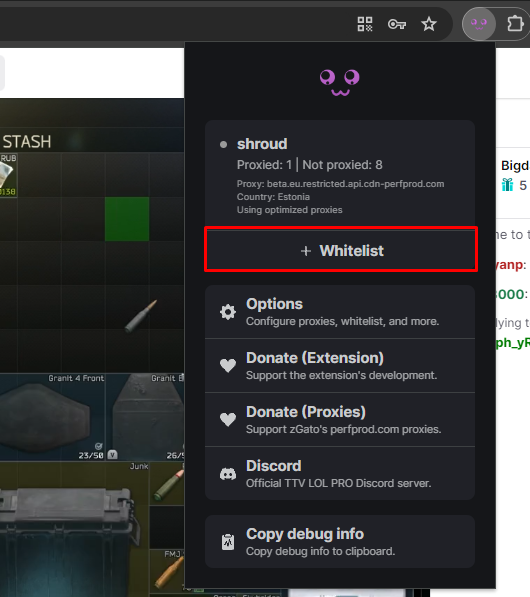
Whitelisting a channel is very easy, you just need to click on the extension's icon (located at the puzzle icon) and click on <mark style="color:green;">**Whitelist**</mark>. Your page will automatically refresh and proceed to leave the stream unproxied until you manually remove the Whitelist, repeating the same steps.

<div><figure><img src="/files/O0NPgdhT7QCsqeRPdch7" alt=""><figcaption><p>Twitch channel not whitelisted</p></figcaption></figure> <figure><img src="/files/phl2VuZrpUiRG7SHWqFk" alt=""><figcaption><p>Twitch channel whitelisted</p></figcaption></figure></div>

## :white\_circle: How to manually whitelist a channel

***

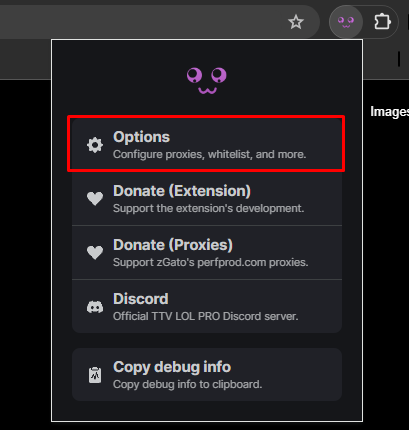
You can also manually add or remove whitelisted channels from the Whitelisted channels list on the extension's options page. Click on the extension's icon (located at the puzzle icon) and click on <mark style="color:red;">**Options.**</mark>

<figure><img src="/files/te180dFyhjHnCKPg57YK" alt=""><figcaption></figcaption></figure>

You'll now find a list to add or remove channels from your proxy whitelist.

<figure><img src="/files/ypp4S0J2DwSybvzKdpP4" alt=""><figcaption></figcaption></figure>


# Adding a proxy

Learn how to add a proxy server to the extension and a quick overview to the different proxy methods.

{% hint style="info" %}
**Info:** by default, the extension has some proxies pre-defined and you don't need to host your own if you don't like. This has been explained more in detail at the following link: [Proxy information](/must-read/proxy-information).
{% endhint %}

## :computer: How to add a proxy server to the extension

***

We need to access the Extension's options page, to do so: click on the extension's icon (located at the puzzle icon) and click on <mark style="color:red;">**Options.**</mark>

<figure><img src="/files/te180dFyhjHnCKPg57YK" alt=""><figcaption></figcaption></figure>

Now in the extension's options page you'll see a Proxies tab in which you'll be able to add proxies to the Proxy ad requests segment or the Proxy all requests segment. Primary proxies are priorized over fallback, and fallback proxies are only used if the proxy above it fails to respond to a request (is down).

{% hint style="success" %}
**Proxy ad requests:** will optimize and only proxy what's strictly needed to avoid Twitch's ads. This method will reduce significatively the bandwidth usage on the server's end.
{% endhint %}

{% hint style="warning" %}
**Proxy all requests:** will just proxy all required requests all the time without analyzing which ones are needed or not to avoid the ads. This method does use more bandwidth than Proxy ad requests but can be considered more reliable.
{% endhint %}

In the following example image you'll see that the Proxy ad requests option is enabled and there's 2 proxies added. This means that by default it will proxy to the first one (beta.eu) and alternatively, if the first one is down, it will proxy to the next one (eu).

The proxy all requests option which is currently disabled does in reverse because I added them like that.

<figure><img src="/files/X7OfxbIoeorPC1uvRAui" alt=""><figcaption></figcaption></figure>

For more advanced settings please go to the following page:

{% content-ref url="/pages/XR7FibWLqfBrnLUd1gSg" %}
[Options page](/advanced/options-page)
{% endcontent-ref %}


# Troubleshooting

{% hint style="info" %}
**About:** basic troubleshooting of issues with the extension. Please check if your issue is listed here, and if it's not, it may be a more advanced issue, in which we recommend you checking out the following page: [Troubleshooting](/advanced/troubleshooting).
{% endhint %}

{% hint style="warning" %}
**Important:** make sure you've already readed the Must Read pages before continuing.
{% endhint %}

## I can't log in on Twitch with the extension enabled

***

{% hint style="info" %}
**TL:DR.** Disable the extension to login, after doing so you can enable it back and you'll not be prompted to login for a long time again.
{% endhint %}

This has been answered before [here](https://github.com/younesaassila/ttv-lol-pro/issues/198). If you're using your own self-hosted proxy you shouldn't have this issue, but if you're using the public proxies, or you have multiple self-hosted proxies, and you have them behind a round-robin load balancer you may experience this issue.

To fix this, make sure all your requests are being proxied through the same server, and not proxied through different ones at the same time. You can use IP hash algorithms for this, for example.

## I have constant buffering, streams appear as offline, ...

***

Default proxies are provided as courtesy with a budget in mind, more information regarding this can be seen in the following page:

{% content-ref url="/pages/QZUjz0XZ6vfrT399vaac" %}
[Proxy information](/must-read/proxy-information)
{% endcontent-ref %}

We're very sorry, and we know the current issues and limitations with the public infrastructure, but unfortunately publicly hosting TTV LOL PRO proxies is nothing near to cheap, and due to the proxies being detected by Twitch, we're constantly in the need of adding more of them.

If you want to support the project development or the costs of the proxies, you'll get rewarded with access to the restricted proxy infrastructure, which is more reliable and available in multiple regions. Take a look at the following page: [Proxy information](/must-read/proxy-information#get-access-to-the-restricted-infrastructure)

Alternatively, you can host your own proxy server, in which case we recommend basic knowledge of how proxies and Linux servers work. You can take a look at the following guide:

{% content-ref url="/pages/YXc5s23ngf0La3TMf5Zp" %}
[Host your own proxy](/guides/proxy/host-your-own-proxy)
{% endcontent-ref %}

## I still get ads after installing the extension

***

If you're self-hosting your own proxy, or using the restricted infrastructure, please take a look at the following page:

{% content-ref url="/pages/uIdqA3AH41Lz5xGPLtiZ" %}
[Troubleshooting](/advanced/troubleshooting)
{% endcontent-ref %}

Firstly, please check that you're indeed proxying correctly. You can check this via the extension's dropdown page.

<figure><img src="/files/Ht7crd0IWDrqH5jAn7e1" alt=""><figcaption></figcaption></figure>

The non proxied count should go up as the stream progresses, and the proxied count only goes up when an ad is intercepted, so you shouldn't worry about that one.

If that's not the case, please check the previous point on this page and make sure to have any other conflicting ad blocker disabled or removed.

If that's the case, please remove any conflicting ad blocker you may still have installed and install the [<mark style="color:purple;">uBlock Origin</mark>](https://ublockorigin.com/) general-purpose ad block extension:

{% embed url="<https://ublockorigin.com/>" %}

After doing so, please check again. If you still see ads, we'll continue by tweaking extension-related options. Please go to the extension's options page via the dropdown:

<figure><img src="/files/uWYmRpUxbA8kOSCrAQsr" alt=""><figcaption></figcaption></figure>

Now let's make sure you have Anonymous mode enabled and move the Passport slider to Official, and try again. If you still see them, move it to Diplomatic.

<figure><img src="/files/jJLnlCWvzHAelk7d9L6d" alt=""><figcaption></figcaption></figure>

If you're still seeing them, make sure to report it to us via our official communication links at the following page:

{% content-ref url="/pages/QUBaUuYZXb9avi53oU6z" %}
[Official Links](/information/official-links)
{% endcontent-ref %}

If you've followed everything correctly, and read all the Must-Read pages in the beginning, you may need to Proxy all requests instead of Proxy ad requests only. Public proxies are not available to be used with this option, so you may want to host your own proxy or support the project to get access to the Restricted Proxy Infrastructure.

{% content-ref url="/pages/QZUjz0XZ6vfrT399vaac" %}
[Proxy information](/must-read/proxy-information)
{% endcontent-ref %}

{% content-ref url="/pages/YXc5s23ngf0La3TMf5Zp" %}
[Host your own proxy](/guides/proxy/host-your-own-proxy)
{% endcontent-ref %}

## My non proxied count keeps going up

***

By default, the extension will just proxy the required traffic for the ad to go away, this means that this is normal as long as there's atleast 1 proxied packet and the Country shown in the dropdown is Russia.

The country shown in the dropdown may vary if you're using the Restricted Infrastructure or your own proxy server, but should never be your own country.

If you've switched from Proxy ad requests only to Proxy all requests in the extension's options page and the non proxied count keeps going up, that means that there's something wrong with the proxy server you're using.

## I get "commercial break in progress" ads

***

There are two types of "commercial break in progress" ads, so we need to identify which one you're getting. Please take a look at the following screenshots. Both seem very similar but they may be served in very unrelated ways.

<div><figure><img src="/files/cP3eD78k0ia94j9R92bt" alt=""><figcaption><p>Old "commercial break in progress"</p></figcaption></figure> <figure><img src="/files/bHORjXm5tvNf5ltOlOeq" alt=""><figcaption><p>New "commercial break in progress"</p></figcaption></figure></div>

### If you're getting served the old version

This means that Twitch has detected that you're using some sort of VPN/Proxy. All users connected to that specific proxy will get this "commercial break in progress" ad break instead of real or no ad at all. You'll need to use a different proxy server than what you're currently using.

Client-sided ad blockers (or scripts) may also get this ad triggered. This was the case a while ago with VAFT, and its "480p trick" to avoid ads.&#x20;

There may be other reasons for this specific ad to be triggered, but we've yet to identify them.

### If you're getting served the new version

{% hint style="info" %}
**TL:DR.** [<mark style="color:purple;">TTV LOL PRO</mark>](https://github.com/younesaassila/ttv-lol-pro) might be able to bypass this specific ad, but it's very difficult and we've still not identified properly why it gets served. You may want to give [VAFT](https://github.com/pixeltris/TwitchAdSolutions?tab=readme-ov-file#scripts) a try if you want to bypass these, but we still don't recommend (nor support it, at all) to use it alongside [<mark style="color:purple;">TTV LOL PRO</mark>](https://github.com/younesaassila/ttv-lol-pro).
{% endhint %}

We're still investigating, and unfortunately we've not found much, but we have a few theories:

This specific ad might be served in very specific scenarios if Twitch detects that you're using some sort of VPN/Proxy/Ad Blocker in general, but in most cases, the old one is served instead. We have the theory that it might also have some sort of relation with server's ASN type (Hosting/ISP/Business/Education/Gov).

We've seen this ad appear more in very specific streamers that may be involved with anything from the following list:

* Runs ad-breaks within the stream itself, outside of Twitch Ads. Third party advertisement company.
* Its account is in a very poor status (streamer knows he might be banned soon).
* Sports or eSports streams that are either being officially streamed or unofficially streamed (with or without its rights to stream it).
* Some sort of advertisement revenue limit on Twitch's end or Streamer's end.
* Some sort of advertisement revenue limit where the Streamer is located, or its region as a whole.
* The streamer has run so many ads that the streamer has hit some sort of limit.
* Slots/Poker/anything related to gambling or such, for which Twitch restricts the advertisement companies shown in those cases.

This ad may be bypassable in some cases, but unfortunately, there are other cases where it gets served to absolutely everyone, so even if you don't use TTV LOL PRO at all, you'll get that instead of a real ad.

We've found some sort of success on bypassing this ad if it's not sticky (gets served based on the Proxy/user region) and using a proxy where it doesn't get served. Some ASN types (ISP/Business/Education/Gov) may have a more success ratio than hosting ones.

## I get ads in VODs, or banner ads

***

We avoid in-stream ads, but VODs or banner ads are not handled by the [<mark style="color:purple;">TTV LOL PRO</mark>](https://github.com/younesaassila/ttv-lol-pro) project, as some other amazing projects already do it.&#x20;

[<mark style="color:purple;">uBlock Origin</mark>](https://ublockorigin.com/) can be used alongside [<mark style="color:purple;">TTV LOL PRO</mark>](https://github.com/younesaassila/ttv-lol-pro) to block VOD and banner ads. Here at [<mark style="color:purple;">TTV LOL PRO</mark>](https://github.com/younesaassila/ttv-lol-pro) we strongly encourage users to use [<mark style="color:purple;">uBlock Origin</mark>](https://ublockorigin.com/) alongside [<mark style="color:purple;">TTV LOL PRO</mark>](https://github.com/younesaassila/ttv-lol-pro).

## I'm trying to use \[insert random VPN provider] HTTP proxy and it doesn't work

***

This has been explained here: [FAQ](/must-read/faq#can-i-use-insert-random-vpn-provider-http-proxies)


# Proxy


# Host your own proxy

This will be a simple tutorial on how to make your own proxy server on an ad-free country to prevent Twitch ads.

{% hint style="info" %}
**Info:** this guide contains affiliate links, which means that if you register and purchase something with my link, I'll be getting a small comission from the provider. This doesn't affect you in any way, and you just help me cover some of the public proxies costs.
{% endhint %}

{% hint style="danger" %}
**Important:** please keep in mind through the whole tutorial that **Twitch doesn't support the IPv6 protocol**, thus you **MUST** have outbound IPv4 available for this to work. Inbound connections can be made using IPv6 without any issues, but you may need to readjust some squid settings for this to work, which we don't cover here.
{% endhint %}

{% hint style="danger" %}
**Important:** please do not follow this tutorial if your plan is to publicly host a server for people to use with TTV LOL PRO. If you want to contribute, you may contact us at [Official Links](/information/official-links) and donate a few of your proxy connections and bandwidth for other users to use. We'll secure everything from our end so you don't need to worry about unwanted traffic, nor commercial break in progress ads.

Additionally, if you have an active VPN subscription with several concurrent connections available, that you don't need, you may also donate that for others to use securely.
{% endhint %}

{% hint style="danger" %}
**Disclaimer:** proxying through another country could open up a range of features that are not accessible in your region, including Predictions, Prime Subscriptions, or currency changes, among others. Please be aware that you take full responsibility for the content passing through your proxy or public ones. It's important to note that in certain countries, features like Predictions might be categorized as gambling, making them inappropriate for minors. If your country doesn't support these features, there are legitimate reasons for it. Stay informed and conduct online research accordingly.
{% endhint %}

{% hint style="warning" %}
**About:** this tutorial has been made using a very unreliable provider. Please use some other provider listed in the "Ad-free countries" section. The cheapest option is going with [Proxy6](https://proxy6.net/en/?r=528519) and using the promo code `taTmJgVHDF` which gives you a small discount to get a proxy server for less than $0.50 USD a month in Russia, and shared amongst other users. You can also skip this tutorial if you go this way.&#x20;

Alternatively, if you don't want to bother with setting up your own proxy or dealing with providers, you can support our project and get access to the restricted proxy infrastructure available all around the world. [Proxy information](/must-read/proxy-information#get-access-to-the-restricted-infrastructure)
{% endhint %}

## List of known ad-free countries

{% hint style="info" %}
**Ad-free country**: no records of ads over the last 12 months.

**Partially ad-free country**: there's records of minimal ads in the last 12 months. Ranging from 1-2 ad(s).
{% endhint %}

***

<table data-full-width="true"><thead><tr><th width="172">Country</th><th width="98" data-type="checkbox">Tested</th><th width="265" align="center">Comments</th><th align="center">Recommended Provider</th></tr></thead><tbody><tr><td>🇷🇺 Russia</td><td>true</td><td align="center">Ad-free country. As of 06/23/2025, limited to 720p stream.</td><td align="center"><a href="https://proxy6.net/en/?r=528519">proxy6.net</a> (promo code: <code>taTmJgVHDF</code>), <a href="https://time-host.net/?from=33731">time-host.net</a>, <a href="https://aeza.net/?ref=364671">aeza.net</a>, <a href="https://www.robovps.biz/?ref=47047">robovps.biz</a>, <a href="https://ruvds.com/pr34929">ruvds.com</a>, <a href="https://justhost.ru/?ref=181709">justhost.ru</a>, <a href="https://kvmka.ru/?from=6082">kvmka.ru</a>, <a href="https://deephost.pw/?from=4346">deephost.pw</a>, <a href="https://4vps.su/r/k502Bb6Fb8a7">4vps.su</a></td></tr><tr><td>🇰🇷 South Korea</td><td>true</td><td align="center">Ad-free country. Limited to 720p stream.</td><td align="center"><a href="https://proxy6.net/en/?r=528519">proxy6.net</a> (promo code: <code>taTmJgVHDF</code>)</td></tr><tr><td>🇦🇱 Albania</td><td>true</td><td align="center">Ad-free country.</td><td align="center"><a href="https://www.albahost.net/r/3">albahost.net</a> (premium), <a href="https://4vps.su/r/k502Bb6Fb8a7">4vps.su</a></td></tr><tr><td>🇲🇩 Moldova</td><td>true</td><td align="center">Ad-free country.</td><td align="center"><a href="https://proxy6.net/en/?r=528519">proxy6.net</a> (promo code: <code>taTmJgVHDF</code>), <a href="https://justhost.ru/?ref=181709">justhost.ru</a>, <a href="https://my.ava.hosting/aff.php?aff=15641">ava.hosting</a></td></tr><tr><td>🇧🇾 Belarus</td><td>true</td><td align="center">Ad-free country.</td><td align="center"><a href="https://proxy6.net/en/?r=528519">proxy6.net</a> (promo code: <code>taTmJgVHDF</code>)</td></tr><tr><td>🇷🇴 Romania</td><td>true</td><td align="center">Ad-free country.</td><td align="center"><a href="https://proxy6.net/en/?r=528519">proxy6.net</a> (promo code: <code>taTmJgVHDF</code>), <a href="https://www.hosteroid.uk/aff.php?aff=1">hosteroid.uk</a> (premium), <a href="https://rarecloud.io/clients/aff.php?aff=51">rarecloud.io</a>, <a href="https://justhost.ru/?ref=181709">justhost.ru</a></td></tr><tr><td>🇱🇻 Latvia</td><td>true</td><td align="center">Ad-free country.</td><td align="center"><a href="https://proxy6.net/en/?r=528519">proxy6.net</a> (promo code: <code>taTmJgVHDF</code>), <a href="https://justhost.ru/?ref=181709">justhost.ru</a>, <a href="https://4vps.su/r/k502Bb6Fb8a7">4vps.su</a></td></tr><tr><td>🇱🇹 Lithuania</td><td>true</td><td align="center">Ad-free country.</td><td align="center"><a href="https://proxy6.net/en/?r=528519">proxy6.net</a> (promo code: <code>taTmJgVHDF</code>), <a href="https://www.bacloud.com/aff.php?aff=532">bacloud.com</a> (premium), <a href="https://www.hosteroid.uk/aff.php?aff=1">hosteroid.uk</a> (premium), <a href="https://justhost.ru/?ref=181709">justhost.ru</a>, <a href="https://4vps.su/r/k502Bb6Fb8a7">4vps.su</a></td></tr><tr><td>🇪🇪 Estonia</td><td>true</td><td align="center">Ad-free country.</td><td align="center"><a href="https://proxy6.net/en/?r=528519">proxy6.net</a> (promo code: <code>taTmJgVHDF</code>), <a href="https://justhost.ru/?ref=181709">justhost.ru</a>, <a href="https://clients.hostslim.eu/aff.php?aff=213">hostslim.eu</a>, <a href="https://4vps.su/r/k502Bb6Fb8a7">4vps.su</a></td></tr><tr><td>🇧🇬 Bulgaria</td><td>true</td><td align="center">Ad-free country.</td><td align="center"><a href="https://proxy6.net/en/?r=528519">proxy6.net</a> (promo code: <code>taTmJgVHDF</code>), <a href="https://alphavps.com/clients/aff.php?aff=615">alphavps.com</a> (premium), <a href="https://justhost.ru/?ref=181709">justhost.ru</a></td></tr><tr><td>🇸🇮 Slovenia</td><td>true</td><td align="center">Ad-free country.</td><td align="center"><a href="https://proxy6.net/en/?r=528519">proxy6.net</a> (promo code: <code>taTmJgVHDF</code>), <a href="https://justhost.ru/?ref=181709">justhost.ru</a></td></tr><tr><td>🇮🇸 Iceland</td><td>true</td><td align="center">Ad-free country.</td><td align="center"><a href="https://justhost.ru/?ref=181709">justhost.ru</a></td></tr><tr><td>🇵🇹 Portugal</td><td>true</td><td align="center">Ad-free country.</td><td align="center"><a href="https://proxy6.net/en/?r=528519">proxy6.net</a> (promo code: <code>taTmJgVHDF</code>), <a href="https://justhost.ru/?ref=181709">justhost.ru</a>, <a href="https://4vps.su/r/k502Bb6Fb8a7">4vps.su</a></td></tr><tr><td>🇭🇷 Croatia</td><td>true</td><td align="center">Ad-free country.</td><td align="center"><a href="https://4vps.su/r/k502Bb6Fb8a7">4vps.su</a></td></tr><tr><td>🇲🇰 North Macedonia</td><td>true</td><td align="center">Ad-free country.</td><td align="center"><a href="https://4vps.su/r/k502Bb6Fb8a7">4vps.su</a></td></tr><tr><td>🇬🇪 Georgia</td><td>true</td><td align="center">Ad-free country.</td><td align="center"><a href="https://proxy6.net/en/?r=528519">proxy6.net</a> (promo code: <code>taTmJgVHDF</code>)</td></tr><tr><td>🇦🇲 Armenia</td><td>true</td><td align="center">Ad-free country.</td><td align="center"><a href="https://proxy6.net/en/?r=528519">proxy6.net</a> (promo code: <code>taTmJgVHDF</code>), <a href="https://justhost.ru/?ref=181709">justhost.ru</a>, <a href="https://4vps.su/r/k502Bb6Fb8a7">4vps.su</a></td></tr><tr><td>🇰🇿 Kazakhstan</td><td>true</td><td align="center">Ad-free country.</td><td align="center"><a href="https://proxy6.net/en/?r=528519">proxy6.net</a> (promo code: <code>taTmJgVHDF</code>), <a href="https://ruvds.com/pr34929">ruvds.com</a>, <a href="https://own.tn/portal/?affid=15">own.tn</a></td></tr><tr><td>🇸🇨 Seychelles</td><td>true</td><td align="center">Ad-free country.</td><td align="center"><a href="https://proxy6.net/en/?r=528519">proxy6.net</a> (promo code: <code>taTmJgVHDF</code>)</td></tr><tr><td>🇺🇦 Ukraine</td><td>true</td><td align="center">Partially ad-free country.</td><td align="center"><a href="https://proxy6.net/en/?r=528519">proxy6.net</a> (promo code: <code>taTmJgVHDF</code>), <a href="https://hostiko.com.ua/en/?p=951980">hostiko.com.ua</a>, <a href="https://justhost.ru/?ref=181709">justhost.ru</a>, <a href="https://4vps.su/r/k502Bb6Fb8a7">4vps.su</a></td></tr><tr><td>🇸🇰 Slovakia</td><td>true</td><td align="center">Partially ad-free country.</td><td align="center"><a href="https://www.hosteroid.uk/aff.php?aff=1">hosteroid.uk</a> (premium)</td></tr><tr><td>🇱🇺 Luxembourg</td><td>true</td><td align="center">Partially ad-free country.</td><td align="center"><a href="https://my.frantech.ca/aff.php?aff=6805">BuyVM</a> (premium)</td></tr><tr><td>🇦🇪 United Arab Emirates</td><td>true</td><td align="center">Partially ad-free country.</td><td align="center"><a href="https://proxy6.net/en/?r=528519">proxy6.net</a> (promo code: <code>taTmJgVHDF</code>), <a href="https://justhost.ru/?ref=181709">justhost.ru</a>, <a href="https://4vps.su/r/k502Bb6Fb8a7">4vps.su</a></td></tr><tr><td>🇷🇸 Serbia</td><td>true</td><td align="center">Partially ad-free country.</td><td align="center"><a href="https://proxy6.net/en/?r=528519">proxy6.net</a> (promo code: <code>taTmJgVHDF</code>), <a href="https://kvmka.ru/?from=6082">kvmka.ru</a>, <a href="https://deephost.pw/?from=4346">deephost.pw</a></td></tr><tr><td>🇵🇱 Poland</td><td>true</td><td align="center">Partially ad-free country.</td><td align="center"><a href="https://proxy6.net/en/?r=528519">proxy6.net</a> (promo code: <code>taTmJgVHDF</code>), <a href="https://skhron.com.ua/aff.php?aff=18">skhron.com.ua</a> (premium), <a href="https://hostiko.com.ua/en/?p=951980">hostiko.com.ua</a>, <a href="https://justhost.ru/?ref=181709">justhost.ru</a>, <a href="https://4vps.su/r/k502Bb6Fb8a7">4vps.su</a></td></tr><tr><td>🇪🇬 Egypt</td><td>true</td><td align="center">Partially ad-free country.</td><td align="center"><a href="https://proxy6.net/en/?r=528519">proxy6.net</a> (promo code: <code>taTmJgVHDF</code>)</td></tr><tr><td>🇮🇱 Israel</td><td>true</td><td align="center">Partially ad-free country.</td><td align="center"><a href="https://proxy6.net/en/?r=528519">proxy6.net</a> (promo code: <code>taTmJgVHDF</code>), <a href="https://justhost.ru/?ref=181709">justhost.ru</a></td></tr></tbody></table>

## Step 1 - Creating your VM

***

Firstly, we need to create our instance. Once you've logged in and added some account balance, go to `Servers -> New Instance`.

<figure><img src="/files/RdsBv1D9pKWVbbS7PSWM" alt=""><figcaption><p>Creating your new Virtual Machine Instance</p></figcaption></figure>

Once you're there, set a random `hostname` you'd like, leave 🇷🇺 Moscow as the region and select Debian 11 (also known as Bullseye) as the image. You can use whatever Linux distro you like the most, but this tutorial focuses on Debian 11 specifically, so results may vary with other Linux distros.

<figure><img src="/files/tmXf7bPgKUmNJBigAJX5" alt=""><figcaption><p>Initial configuration before deploying</p></figcaption></figure>

Proceed to select the flavor you'd like (the cheapest one should work just fine, but if you want more power, go ahead!) and leave the rest as default. You can now deploy your instance.

<figure><img src="/files/s0UbSHw2iZUqhq0Kr42C" alt=""><figcaption><p>Initial configuration before deploying</p></figcaption></figure>

## Step 2 - Accessing the VM

***

After you've done the above steps, you will be able to log in into your VM. Proceed to open a Command Prompt (Or Windows Terminal) window:\
Execute the following command: `ssh root@server-ip`. Remember to replace `server-ip` with your server IP address, which you can find in your Servers control panel.

<figure><img src="/files/tsD68bh4nOZUqpKuyOP5" alt=""><figcaption><p>Initial SSH access to your VM</p></figcaption></figure>

Once done, it will prompt for the root password. Check your email to get your root password. If that password doesn't work, go back to your Instances page in your browser and change it under the Security tab.

## Step 3 - Basic Initial Setup

***

After you've logged in, proceed to update your package repositories and upgrade the needed packages.\
Execute the following command: `apt update && apt upgrade -y`

<figure><img src="/files/BxXVax7Q7AdHNSVRMAxK" alt=""><figcaption><p>Upgrading system packages</p></figcaption></figure>

Once the update process finishes, lets setup auto-updates so you don't need to worry about the server anymore. Execute the following command: `apt install unattended-upgrades -y`

<figure><img src="/files/jGjJWy7J0gevAi1PzVqA" alt=""><figcaption><p>Installing unattended-upgrades package</p></figcaption></figure>

Now let's enable it!\
Execute the following command: `dpkg-reconfigure --priority=low unattended-upgrades` and proceed to agree to Automatically download and install stable updates.

{% hint style="info" %}
**Info:** if you're prompted to install an updated version of the package's config, proceed to select the first option (install the package maintaner's version)
{% endhint %}

<figure><img src="/files/AHaRzDBYvfGUQdOYCatI" alt=""><figcaption><p>Configuring the unattended-upgrades package</p></figcaption></figure>

<figure><img src="/files/BMS6N8eXVAfh0GFoBTYY" alt=""><figcaption><p>Configuring the unattended-upgrades package</p></figcaption></figure>

## Step 4 - Proxy Server Setup

***

We'll be installing the software `squid` for it to act as our proxy server.\
To install it, execute the following command: `apt install squid -y`

<figure><img src="/files/FXaDxQqsIBFY5ZH3Yd0j" alt=""><figcaption><p>Installing our proxy server software</p></figcaption></figure>

Once you're here, you can take the more or less secure route of configuring your proxy server.

<details>

<summary><span data-gb-custom-inline data-tag="emoji" data-code="2705">✅</span> Secure</summary>

You'll be allowing to use the proxy to a limited amount of IP addresses, making it more secure, but less convinient if you have a dynamic IP address.

Proceed to edit the `squid.conf` file.\
Execute the following the command: `nano /etc/squid/squid.conf`

<img src="/files/8XnTIEWcAYt6WpI3lToE" alt="" data-size="original">

Once you're editing the file, press `Ctrl + W` and search for `http_access deny all`

<img src="/files/W7VrMFXV2iVPyFJEXPqb" alt="" data-size="original">

Add the following lines before `http_access deny all` as shown in the screenshot. Remember to replace `your_ip` with your Public IPv4 address ([what's my ip?](https://whatismyipaddress.com/))

![](/files/BFsqWJln4aqeJntdO8d5)

Here's all the lines for you to copy and paste:

<pre class="language-powershell" data-title="squid.conf"><code class="lang-powershell"># Twitch ACL for video-weaver.*.hls.ttvnw.net
acl twitch dstdom_regex video-weaver\.\w+\.hls\.ttvnw\.net

# Twitch ACL for playlist.live-video.net
acl twitchplaylist dstdom_regex \w+\.playlist\.live-video\.net

# Twitch ACL for playlist.ttvnw.net
acl twitchplaylist2 dstdom_regex [a-z0-9-]+\.playlist\.ttvnw\.net

# Twitch ACL for usher.ttvnw.net
acl twitchusher dstdomain usher.ttvnw.net

# Twitch ACL for gql.twitch.tv
acl twitchgql dstdomain gql.twitch.tv

# Twitch ACL for passport.twitch.tv
acl twitchpassport dstdomain passport.twitch.tv

# Twitch ACL for www.twitch.tv
acl twitchwww dstdomain www.twitch.tv

# Allow rules for your public IP address

acl myip src your_ip
<strong>http_access allow myip twitch
</strong>http_access allow myip twitchplaylist
http_access allow myip twitchplaylist2
http_access allow myip twitchusher
http_access allow myip twitchgql
http_access allow myip twitchpassport
http_access allow myip twitchwww
</code></pre>

</details>

<details>

<summary><span data-gb-custom-inline data-tag="emoji" data-code="26a0">⚠️</span> Less Secure</summary>

You'll be allowing to use the proxy to an unlimited amount of IP addresses, making it less secure, but more convenient if you don't have an static IP address. You'll also restrict the proxy server to only allow what we need to.

Proceed to edit the `squid.conf` file.\
Execute the following the command: `nano /etc/squid/squid.conf`

<img src="/files/8XnTIEWcAYt6WpI3lToE" alt="" data-size="original">

Once you're editing the file, press `Ctrl + W` and search for `http_access deny all`

<img src="/files/W7VrMFXV2iVPyFJEXPqb" alt="" data-size="original">

Add the following lines before `http_access deny all` as shown in the screenshot.&#x20;

![](/files/VoY49De1dqdGvEOMBW7X)

Here's all the lines for you to copy and paste.

{% code title="squid.conf" %}

```powershell
# Twitch ACL for video-weaver.*.hls.ttvnw.net
acl twitch dstdom_regex video-weaver\.\w+\.hls\.ttvnw\.net
http_access allow twitch

# Twitch ACL for playlist.live-video.net
acl twitchplaylist dstdom_regex \w+\.playlist\.live-video\.net
http_access allow twitchplaylist

# Twitch ACL for playlist.ttvnw.net
acl twitchplaylist2 dstdom_regex [a-z0-9-]+\.playlist\.ttvnw\.net
http_access allow twitchplaylist2

# Twitch ACL for usher.ttvnw.net
acl twitchusher dstdomain usher.ttvnw.net
http_access allow twitchusher

# Twitch ACL for gql.twitch.tv
acl twitchgql dstdomain gql.twitch.tv
http_access allow twitchgql

# Twitch ACL for passport.twitch.tv
acl twitchpassport dstdomain passport.twitch.tv
http_access allow twitchpassport

# Twitch ACL for www.twitch.tv
acl twitchwww dstdomain www.twitch.tv
http_access allow twitchwww
```

{% endcode %}

</details>

Alternatively, you could also set up password-based authentication for the proxy server, but that goes outside the scope of this tutorial. Please follow the following guide if you'd like to set up password-based authentication.

{% embed url="<https://www.digitalocean.com/community/tutorials/how-to-set-up-squid-proxy-for-private-connections-on-debian-11>" %}

Following with the tutorial, you can change the default port that the proxy listens to. This can make your proxy more "secure" (security over obscurity), preventing servers on the internet port checking and possibly adding you to a public proxy list.\
Execute the following the command: `nano /etc/squid/squid.conf`

<figure><img src="/files/8XnTIEWcAYt6WpI3lToE" alt=""><figcaption><p>Editing the squid config file</p></figcaption></figure>

Once you're editing the file, press `Ctrl + W` and search for `http_port 3128`

<figure><img src="/files/ocDh26NOSecnS5rifK2g" alt=""><figcaption><p>Editing the squid config file</p></figcaption></figure>

Change the `3128` port value to some random number value between `1025 - 65535`

<figure><img src="/files/coPGBvMiqjcl73PtSOPi" alt=""><figcaption><p>Editing the squid default port number value</p></figcaption></figure>

Save the file by pressing `Ctrl + X` then pressing `Y` then `Enter`

Proceed to restart the `squid` service with the following command: `service squid restart`\
This will take a while, please be patient.

## Step 5 - Connecting to the proxy

***

And you're all set! You can now add your proxy server in your Extension's Options page!

Please use the following syntax: `server-ip:squidport`

Alternatively, you can provide the extension with authentication credentials if you've configured `squid` with a password using the following syntax: `youruser:yourpassword@server-ip:squidport`

## Wrapping up

***

With this tutorial, you've managed to set up your own custom proxy server, using specific rules to make it work only for what's intended to be used for.

{% hint style="warning" %}
**Important:** this tuturial covers the basics of setting up automatic updates on your Linux server. Please follow alternative tutorials, such as the one linked right below, to harden your Linux server.
{% endhint %}

{% embed url="<https://www.digitalocean.com/community/tutorials/recommended-security-measures-to-protect-your-servers>" %}

{% hint style="warning" %}
**Important:** please keep a regular reboot schedule of your server, for example once a month to ensure latest updates are applied and cache cleanup.
{% endhint %}


# Options page

{% hint style="info" %}
**Info:** about all the options in the extension's options page. For advanced users only.
{% endhint %}

## :passport\_control: Passport

***

{% hint style="warning" %}
**Important:** increase the slider only if you are seeing ads with the current setting. If you are seeing "Commercial break in progress" ads, increasing the slider will not help.
{% endhint %}

Controls which types of requests are proxied, in which you have three options to choose from: **Ordinary**, **Official** and **Diplomatic**. The Ordinary option is the most proxy-friendly and will have low proxy usage, whilst Official and Diplomatic may use more frequently the proxy, with more traffic.

Depending on if you're using the Proxy ad requests only option or the Proxy all requests option, the Passport proxy usage will vary, with the latter being the most bandwidth/CPU intensive. Below you'll find a table with some information in regards:

### If you're using the Proxy ad requests only option

<table><thead><tr><th width="255">Domain</th><th>Ordinary<select><option value="8pQvMUOg8fbn" label="All" color="blue"></option><option value="wbJuSSVtlWKG" label="Few" color="blue"></option><option value="9vgpLAhasuGy" label="None" color="blue"></option></select></th><th>Official<select><option value="iyNj6HNA2qRX" label="All" color="blue"></option><option value="mNNYCsHkYTcB" label="Few" color="blue"></option><option value="fcHQCfCIccWw" label="None" color="blue"></option></select></th><th>Diplomatic<select><option value="YKzojVUTXHcH" label="All" color="blue"></option><option value="ePZAANOOIsEV" label="Few" color="blue"></option><option value="fPaFW56mao9D" label="None" color="blue"></option><option value="9pLbVKPLYEoh" label="Some" color="blue"></option></select></th></tr></thead><tbody><tr><td>passport.twitch.tv</td><td><span data-option="9vgpLAhasuGy">None</span></td><td><span data-option="iyNj6HNA2qRX">All</span></td><td><span data-option="YKzojVUTXHcH">All</span></td></tr><tr><td>usher.ttvnw.net</td><td><span data-option="8pQvMUOg8fbn">All</span></td><td><span data-option="iyNj6HNA2qRX">All</span></td><td><span data-option="YKzojVUTXHcH">All</span></td></tr><tr><td>video-weaver.*.hls.ttvnw.net</td><td><span data-option="wbJuSSVtlWKG">Few</span></td><td><span data-option="mNNYCsHkYTcB">Few</span></td><td><span data-option="ePZAANOOIsEV">Few</span></td></tr><tr><td>*.playlist.ttvnw.net</td><td><span data-option="wbJuSSVtlWKG">Few</span></td><td><span data-option="mNNYCsHkYTcB">Few</span></td><td><span data-option="ePZAANOOIsEV">Few</span></td></tr><tr><td>*.playlist.live-video.net</td><td><span data-option="wbJuSSVtlWKG">Few</span></td><td><span data-option="mNNYCsHkYTcB">Few</span></td><td><span data-option="ePZAANOOIsEV">Few</span></td></tr><tr><td>gql.twitch.tv</td><td><span data-option="9vgpLAhasuGy">None</span></td><td><span data-option="mNNYCsHkYTcB">Few</span></td><td><span data-option="9pLbVKPLYEoh">Some</span></td></tr><tr><td>www.twitch.tv</td><td><span data-option="9vgpLAhasuGy">None</span></td><td><span data-option="fcHQCfCIccWw">None</span></td><td><span data-option="YKzojVUTXHcH">All</span></td></tr></tbody></table>

### If you're using the Proxy all requests option

<table><thead><tr><th width="254">Domain</th><th>Ordinary<select><option value="5730fRcjWsvk" label="All" color="blue"></option><option value="KJpyFasGMimF" label="None" color="blue"></option><option value="zEmlDoEmx7GR" label="Few" color="blue"></option></select></th><th>Official<select><option value="3cvxs8Zs3uAW" label="All" color="blue"></option><option value="nElq6wOsQaEx" label="None" color="blue"></option><option value="TN1aogp41Mwd" label="Few" color="blue"></option></select></th><th>Diplomatic<select><option value="ut8QF99jTft8" label="All" color="blue"></option><option value="ORbEmgV4tBsn" label="None" color="blue"></option><option value="iS3Y3TnJrJ7N" label="Few" color="blue"></option></select></th></tr></thead><tbody><tr><td>passport.twitch.tv</td><td><span data-option="5730fRcjWsvk">All</span></td><td><span data-option="3cvxs8Zs3uAW">All</span></td><td><span data-option="ut8QF99jTft8">All</span></td></tr><tr><td>usher.ttvnw.net</td><td><span data-option="5730fRcjWsvk">All</span></td><td><span data-option="3cvxs8Zs3uAW">All</span></td><td><span data-option="ut8QF99jTft8">All</span></td></tr><tr><td>video-weaver.*.hls.ttvnw.net</td><td><span data-option="5730fRcjWsvk">All</span></td><td><span data-option="3cvxs8Zs3uAW">All</span></td><td><span data-option="ut8QF99jTft8">All</span></td></tr><tr><td>*.playlist.ttvnw.net</td><td><span data-option="5730fRcjWsvk">All</span></td><td><span data-option="3cvxs8Zs3uAW">All</span></td><td><span data-option="ut8QF99jTft8">All</span></td></tr><tr><td>*.playlist.live-video.net</td><td><span data-option="5730fRcjWsvk">All</span></td><td><span data-option="3cvxs8Zs3uAW">All</span></td><td><span data-option="ut8QF99jTft8">All</span></td></tr><tr><td>gql.twitch.tv</td><td><span data-option="KJpyFasGMimF">None</span></td><td><span data-option="3cvxs8Zs3uAW">All</span></td><td><span data-option="ut8QF99jTft8">All</span></td></tr><tr><td>www.twitch.tv</td><td><span data-option="KJpyFasGMimF">None</span></td><td><span data-option="nElq6wOsQaEx">None</span></td><td><span data-option="ut8QF99jTft8">All</span></td></tr></tbody></table>

## :bust\_in\_silhouette: Anonymous mode

***

Watch streams as if you were logged out. This option might help reduce the number of "Commercial break in progress" ads.

To make this work, we remove certain user identifiable headers from some requests to Twitch, but we try not to break anything, so please report us any issues with this option enabled at our [Official Links](/information/official-links).&#x20;

Drops should work just fine, same applies to Channel Points and others, however there's been some reports lately of Drops not working due to some Twitch "feature" update, so if you're in this situation, you may have to disable it.

## :white\_heart: Whitelisted channels

***

{% hint style="warning" %}
**For Chromium users:** whitelisting will only work when all opened Twitch tabs are whitelisted channels
{% endhint %}

Support your favorite content creators by whitelisting their channels. You can manually add channels there and once the extension detects that you're on that specific channel, any sort of proxying to that stream will be disabled.

## :desktop: Proxies

***

Add proxies for the extension to bypass/avoid Twitch ads. Proxies **must be HTTP** and other protocols such as HTTPS, SOCKS4, SOCKS5, ... are not compatible.

You can add proxies in the **Primary** or the **Fallback** field. Each time you restart your browser, by default, the first proxy in the list will be selected for proxying Twitch traffic. If a request fails to that specific proxy server, it will try proxying to the second one, and so on. This does not mean that each request will be tested with the first server always, but if the first server fails, it will be deemed as dead by the browser and will only proxy on the working one until you restart your browser, or TTV LOL PRO stops managing the browser's Proxy settings.

{% hint style="warning" %}
Proxy fallback is handled by the browser itself, and we have no control over it, so it may behave differently on Firefox than on Chromium-based browsers.
{% endhint %}

If there are no proxies available to use due to them being dead or not adding any to the list, the browser will just not proxy any traffic and the following banner will be shown in the extension's dropdown page.

<figure><img src="/files/VYuwXorUN6npLde5lYG2" alt=""><figcaption></figcaption></figure>

Well, now that we know how proxies will be handled by the extension, let's explain the differences between Proxy ad requests only and Proxy all requests.

Take a look at the following table to know which traffic and how much of it is getting proxied depending on the option you choose: [Options page](/advanced/options-page#passport).

### Proxy ad requests only

{% hint style="success" %}
**Recommended:** option to use by default if it works fine for you, but may be less reliable.
{% endhint %}

By default, the option Proxy ad requests only will be selected, which means that fewer packets will be proxied to the server, thus less bandwidth/CPU will be used on the server's side.&#x20;

This option kinda "exploits" a bug in how Twitch serves ads, which means that it could get patched at any time. Nonetheless, newer versions of the extension (2.3 and above) have huge improvements to this proxying option and are way more reliable.

As we're not actively proxying weaver requests, Twitch will reassign you to your closest weaver server possible (despite the proxy's location) after a few minutes have passed from the proxied requests. This also means that you'll get reassigned again to your proxy's closest Twitch streaming server when a midroll is intercepted by TTV LOL PRO, or switch between streamers.&#x20;

As we've not actively experimented with this, we can't certainly say if latency to the streamer is affected by using this option or the Proxy all requests option. If anyone wants to experiment with this, we would appreciate some feedback at our [Official Links](/information/official-links).

### Proxy all requests

{% hint style="warning" %}
**Recommended:** option to use if you don't have very limited CPU/bandwidth allocations and want a more consistent and reliable stream.
{% endhint %}

This proxying option is opt-in by default. This proxying mechanism, by design, uses more CPU and Bandwidth on the server's side as (primarily) we're constantly proxying weaver requests without applying any algorithm to check whether we should proxy that request or not, as we don't need to proxy most of them.

This option is more consistent and reliable because you'll always be assigned to the same Twitch streaming server, which means that your latency to the broadcaster will be consistent and will not vary depending on if TTV LOL PRO needs to intercept an ad or not.

{% hint style="warning" %}
**Important:** this option is always more consistent and reliable whenever your proxy server has good connectivity to you and to Twitch's streaming servers, which most of them do.
{% endhint %}

## :scroll: Ad log

***

{% hint style="danger" %}
**This option is only available for the Firefox version of the extension**
{% endhint %}

By default, this ad log will be enabled, which means that TTV LOL PRO will log all ads (only on your computer) that did not get bypassed/avoided for debugging purposes only.&#x20;

Do keep in mind that entries are automatically removed after 7 days, on the client-side (Extension) and on the server-side (Where it gets logged if you opt to send the ad log to the developer).

You may opt into sending the ad log to the developer if you'd like, in which case we periodically check them to ensure that there are no issues with the extension. You can also export the ad log as a JSON file or clear the ad log, but keep in mind that all logs sent to the developer are not removed with this button, but automatically removed every week.

{% hint style="success" %}
**We don't log any sort of information that may identify the user who sent it, at all.** We only log the following information:

* **adType:** preroll/midroll
* **isPurpleScreen:** false/true
* **proxy:** "your proxy address" (stripped when sending ad log to the developer) or null
* **channel:** "channel name"
* **passportLevel:** 0, 1 or 2
* **anonymousMode:** false/true
* **timestamp:** timestamp
* **videoWeaverHost:** "video-weaver.$.hls.ttvnw\.net" or "$.playlist.ttvnw\.net" or "$.playlist.live-video.net"
* **videoWeaverUrl:** "like above, but the m3u8 file itself"
  {% endhint %}


# Troubleshooting


# Knowledge Base

This is the official TTV LOL PRO Knowledge Base with information regarding the project and it's functionality, aswell as some tips and tricks.

{% hint style="info" %}
**Help:** if you don't find any information regarding your question, please let us know via our official contact methods and we'll happily help you.
{% endhint %}

## :globe\_with\_meridians: Overview

***

[<mark style="color:purple;">TTV LOL PRO</mark>](https://github.com/younesaassila/ttv-lol-pro/tree/v1) removes most livestream ads from Twitch. This is free, don't expect it to be perfect.

[<mark style="color:purple;">TTV LOL PRO</mark>](https://github.com/younesaassila/ttv-lol-pro/tree/v1) is a fork of [TTV LOL](https://github.com/TTV-LOL/extensions) that:

* disables [TTV LOL](https://github.com/TTV-LOL/extensions) for channels you are subscribed to,
* lets you whitelist channels,
* improves [TTV LOL](https://github.com/TTV-LOL/extensions)'s popup by showing stream status and "Whitelist" button,
* falls back to the stream with ads if the API server errors out,
* improves your privacy by removing your Twitch token from API requests,
* lets you add custom primary/fallback proxies.

{% embed url="<https://github.com/younesaassila/ttv-lol-pro/tree/v1>" %}
The project
{% endembed %}

## :purple\_heart: Our team

***

{% embed url="<https://github.com/younesaassila>" %}
The extension maintainer
{% endembed %}

## :information\_source: Must read

***

{% content-ref url="/pages/wTbTf4q5RC0VVh13dyIC" %}
[Current state](/v1/current-state)
{% endcontent-ref %}

{% content-ref url="/pages/MmckjsAdcfWAdJa2NZzy" %}
[How it works](/v1/must-read/how-it-works)
{% endcontent-ref %}

{% content-ref url="/pages/yxJECCfIRepoRETuuYw3" %}
[Proxies](/v1/must-read/proxies)
{% endcontent-ref %}


# Current state

{% hint style="danger" %}
**Important:** considerations of the current state of TTV LOL PRO's V1 branch. We only recommend using this branch if you're an advanced user, and be aware that there's no support for this anymore.
{% endhint %}

## :purple\_circle: Twitch's stance on m3u8 "proxies/relays" or third party apps

***

Twitch rolled out a game-breaking change last year (31st of May 2023) and reverted their change on the first of June of that same year.&#x20;

They enforced an integrity check (added a while back in September 2022) to their GraphQL endpoint (used to grab the required PlaybackAccessToken) using [<mark style="color:red;">kasada</mark>](https://www.kasada.io/) which is a company specialized on preventing/blocking bots / protecting APIs. This integrity check broke V1's API proxies as integrity checks were failing.

With this change, seems like Twitch broke some of their own applications, as to why (most likely) they reverted it back.&#x20;

It's been a while and Twitch hasn't rolled out an update like this, most likely due to the requirements of this bot check and some platforms/devices (such as the Nintendo Switch or SmartTVs) not being able to complete the required bot check due to their lack of dependencies.

More information regarding this change and their side effects can be found [here](https://github.com/streamlink/streamlink/issues/5370) and [here](https://github.com/AlyoshaVasilieva/luminous-ttv/issues/13)


# How it works

{% hint style="warning" %}
**Learn:** we strongly recommend you reading the following so you know how we make this work before continuing to the installation.
{% endhint %}

## :thinking: How it works

***

[<mark style="color:purple;">TTV LOL PRO</mark>](https://github.com/younesaassila/ttv-lol-pro/tree/v1) uses a proxy-based solution to avoid any ads on Twitch. Twitch ads can't be blocked, at all, but can be avoided/bypassed.

Also known as "server-sided" solutions, [<mark style="color:purple;">TTV LOL PRO</mark>](https://github.com/younesaassila/ttv-lol-pro/tree/v1) fully relies on a proxy in an ad-free country for it to avoid any possible Twitch ad.&#x20;

The "[<mark style="color:blue;">TTV LOL</mark>](https://github.com/TTV-LOL/extensions) method" of avoiding ads consists on grabbing the m3u8 file for that specific streamer from a proxy which is hosted in an ad-free country, thus giving you an ad-free playlist.

We avoid in-stream ads, but VODs or banner ads are not handled by the [<mark style="color:purple;">TTV LOL PRO</mark>](https://github.com/younesaassila/ttv-lol-pro/tree/v1) project, as some other amazing projects already do it.&#x20;

[<mark style="color:purple;">uBlock Origin</mark>](https://ublockorigin.com/) can be used alongside [<mark style="color:purple;">TTV LOL PRO</mark>](https://github.com/younesaassila/ttv-lol-pro/tree/v1) to block VOD and banner ads. Here at [<mark style="color:purple;">TTV LOL PRO</mark>](https://github.com/younesaassila/ttv-lol-pro/tree/v1) we strongly encourage users to use [<mark style="color:purple;">uBlock Origin</mark>](https://ublockorigin.com/) alongside [<mark style="color:purple;">TTV LOL PRO</mark>](https://github.com/younesaassila/ttv-lol-pro/tree/v1).

Additionally, you can add the following [<mark style="color:purple;">uBlock Origin</mark>](https://ublockorigin.com/) filter that's maintained by us to remove some stuff that [<mark style="color:purple;">uBlock Origin</mark>](https://ublockorigin.com/) default filters don't: `https://cdn.perfprod.com/static/ttvlolpro-rules.txt`

{% hint style="danger" %}
[<mark style="color:purple;">TTV LOL PRO</mark>](https://github.com/younesaassila/ttv-lol-pro/tree/v1) by default uses the [TTV LOL](https://github.com/TTV-LOL/extensions) API (api.ttv.lol) which has been offline for a few months already, and there's not been any signs of it coming back anytime soon. This means, that a default installation of the extension won't avoid any ads until you add working proxies. More information here: [Proxies](/v1/must-read/proxies).
{% endhint %}


# Proxies

Find information regarding the downsides of using Proxy-based solutions, and a whole list of Public Proxies for you to use.

## :red\_circle: Proxies downsides

***

You need to assume that if you use some other user's infrastructure, you're agreeing that required maintenance and proxy downtime may occur.

Consider giving your support by covering some of their infrastructure costs via donations if you feel they do a great job. You would have to pay 12€ / month to Twitch if amazing people in the community didn't spend their time looking for circumventions/hosting public proxies for you to have a free ad-free experience.

## :link: Public proxy list

***

All the following proxies are using the [luminous-ttv](https://github.com/AlyoshaVasilieva/luminous-ttv) project, by [Malloc Voidstar](https://github.com/AlyoshaVasilieva).

PerfProd proxies are being hosted by [zGato](https://github.com/zGato). You can view the current status of the proxies [here](https://status.cdn-perfprod.com/).

Luminous proxies are being hosted by [Malloc Voidstar](https://github.com/AlyoshaVasilieva). You can view the current status of the proxies [here](https://stats.uptimerobot.com/N2pVRCZAjg).

### :flag\_eu: Europe addresses

***

<details>

<summary><span data-gb-custom-inline data-tag="emoji" data-code="1f49a">💚</span> PerfProd</summary>

* `https://lb-eu.cdn-perfprod.com`
  * Proxied to various countries.&#x20;
  * Twitch CDN assignment: `EU`.
  * Recommended for Desktop & Mobile users.
* `https://lb-eu2.cdn-perfprod.com`
  * Proxied to various countries.&#x20;
  * Twitch CDN assignment: `EU`.
  * Recommended for Desktop & Mobile users.
* `https://lb-eu3.cdn-perfprod.com`
  * Proxied to 🇷🇺 Russia.&#x20;
  * Twitch CDN assignment: `EU`.
  * Recommended for Mobile users.
* `https://lb-eu4.cdn-perfprod.com`
  * Proxied to various countries.&#x20;
  * Twitch CDN assignment: `EU`.
  * Recommended for Desktop & Mobile users.
* `https://lb-eu5.cdn-perfprod.com`
  * Proxied to various countries.&#x20;
  * Twitch CDN assignment: `EU`.
  * Recommended for Desktop & Mobile users.

</details>

<details>

<summary><span data-gb-custom-inline data-tag="emoji" data-code="1f49a">💚</span> Luminous</summary>

* `https://eu.luminous.dev`
  * Proxied to 🇷🇺 Russia.&#x20;
  * Twitch CDN assignment: `EU`.
  * Recommended for Mobile users.
* `https://eu2.luminous.dev`
  * Proxied to 🇺🇦 Ukraine.&#x20;
  * Twitch CDN assignment: `EU`.
  * Recommended for Mobile users.
* `https://eu3.luminous.dev`
  * Proxied to 🇧🇬 Bulgaria.&#x20;
  * Twitch CDN assignment: `EU`.
  * Recommended for Mobile users.

</details>

### :flag\_us: North America addresses

***

<details>

<summary><span data-gb-custom-inline data-tag="emoji" data-code="1f49a">💚</span> PerfProd</summary>

* `https://lb-na.cdn-perfprod.com`
  * Proxied to 🇺🇸 Phoenix, AZ, US.&#x20;
  * Twitch CDN assignment: `NA`.
  * Recommended for Desktop & Mobile users.

</details>

### :flag\_sg: Asia addresses

***

<details>

<summary><span data-gb-custom-inline data-tag="emoji" data-code="1f49a">💚</span> PerfProd</summary>

* `https://lb-as.cdn-perfprod.com`
  * Proxied to various countries.&#x20;
  * Twitch CDN assignment: `AS`.
  * Recommended for Desktop & Mobile users.

</details>

<details>

<summary><span data-gb-custom-inline data-tag="emoji" data-code="1f49a">💚</span> Luminous</summary>

* `https://as.luminous.dev`
  * Proxied to 🇰🇿 Kazakhstan.&#x20;
  * Twitch CDN assignment: `EU`.
  * Recommended for Desktop & Mobile users.

</details>

### :flag\_br: South America addresses

***

<details>

<summary><span data-gb-custom-inline data-tag="emoji" data-code="1f49a">💚</span> PerfProd</summary>

* `https://lb-sa.cdn-perfprod.com`
  * Proxied to 🇺🇸 New York.&#x20;
  * Twitch CDN assignment: `NA`.
  * Recommended for Desktop & Mobile users.

</details>